
Doc / JSON / Python / HTML dashboard (ZIP + PDF)Put a real approval step between your agent and anything that spends, sends, posts or deletes. Includes: a design guide (risk tiers raised by arguments, what the approver must see, fail-closed expiry); review-surface patterns for approval queues on chat, web and mobile; audit-log views and weekly metrics (approval rate, time to decision, expiry rate, rubber-stamp and unmatched-execute flags); a self-contained HTML dashboard you can host yourself for pending approvals, metrics and a filterable audit log; an approver playbook; gate_policy.json; approval_gate.py, which binds each yes to a hash of the exact payload and refuses altered or expired requests; and audit_report.py, which computes the metrics. Complements the MCP Tool Access Review.
What's inside
01_Approval_Gate_Design.md02_Approver_Playbook.md03_Review_Surfaces_and_Metrics.mdgate_policy.jsonapproval_gate.pyaudit_report.pysample_audit_log.jsonldashboard.html12_Human_Approval_Gates_Kit.pdf: every document in one printable guide
Verify it works
python3 approval_gate.py --selftestprintsselftest ok. It checks tier assignment, argument-based escalation, budget exhaustion, payload-hash binding, expiry (fail closed) and denial.python3 approval_gate.py classify gate_policy.json refund '{"amount_usd": 300}'returns tierapprovewith a request carrying aparams_hash.- Edit
gate_policy.jsonfor your own tools and thresholds; re-run step 2 for each high-risk tool. - Wire
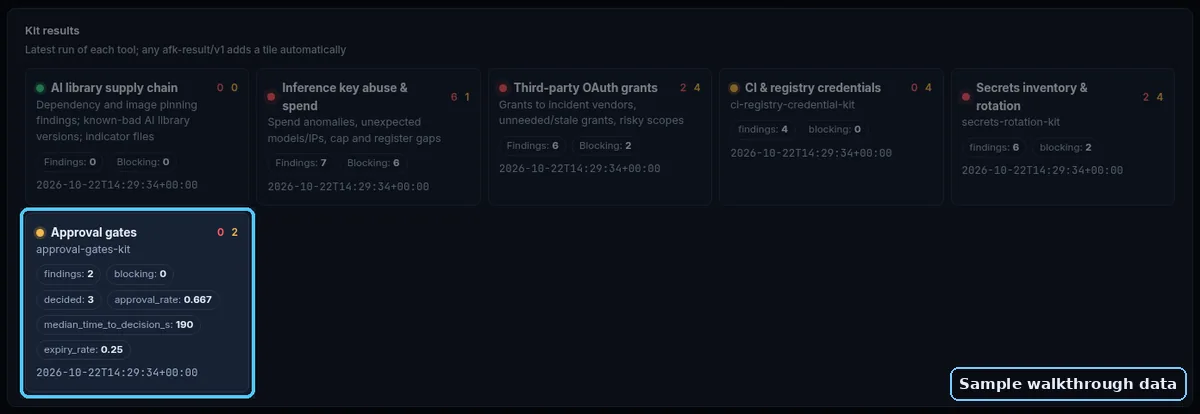
Gate.decide/Gate.executearound your tool executor (see the docstring), and route requests to your approvers with02_Approver_Playbook.md. python3 audit_report.py --selftestprintsselftest ok;python3 audit_report.py sample_audit_log.jsonlshows approval rate 66.7%, one expiry, one payload-changed refusal and a rubber-stamp flag forlee.- Open
dashboard.htmlin a browser and loadsample_audit_log.jsonl: metrics, flags and the filterable log appear. It makes no network calls unless you pass?log=/your/path.jsonlon your own host. Python 3.9+, no installs.
Preview
First part of the main document, shown as-is:
Human Approval Gates for AI Agents: design guide
"Human in the loop" only works when the human approves a specific action, not a story about one. This guide gives you a gate that sits in your code at the one place tool calls turn into side effects, so a prompt injection or a confused model can't talk its way past it.
Where the gate sits
Between the model's proposed tool call and the code that runs it. The model never decides whether approval is needed; your policy does. Asking the model to "check with the user first" is a prompt, and prompts can be skipped or overridden.
Risk tiers (set per tool, raised by arguments)
| Tier | Behaviour | Typical examples |
|---|---|---|
| auto | Runs immediately, logged | Read-only lookups, internal drafts |
| budgeted | Runs immediately up to a per-run budget, then escalates to approve |
Small reversible writes, internal notes |
| approve | Waits for a named human decision | Money movement, sending or posting as a person or brand, deleting data, deploys |
| block | Never runs from an agent | Actions you have decided agents must not take |
Arguments raise tiers: a $10 refund and a $4,000 refund are different actions. Put thresholds in gate_policy.json, not in prompts.
The approval request (what the human sees)
Every request carries: action type, target system and resource, the exact normalized parameters, a preview or diff, the agent's stated reason and evidence, risk tier and which rule triggered it, rollback path, expiry, and an idempotency key.